InvoicesCrafts
Start with the agreement, not the total
Before opening the invoice builder, gather the proposal, agreed rates, purchase-order reference and any approved changes to the scope. Check whether the client expects an invoice for a completed project, a milestone or work delivered during a particular month. Your line items should reflect that agreement.
If the client's accounts team requires a purchase-order number or a particular billing contact, collect it before sending. Adding a project name and a service period can make the invoice easier to match with the work, especially when you have more than one engagement with the same client.
Make hourly work easy to check
For hourly work, use the hours as the quantity and your agreed hourly rate as the unit price. Give the item a concrete description: UX design review, 1–5 October is more useful than Services. Keep your underlying time record so you can explain the hours if the client asks.
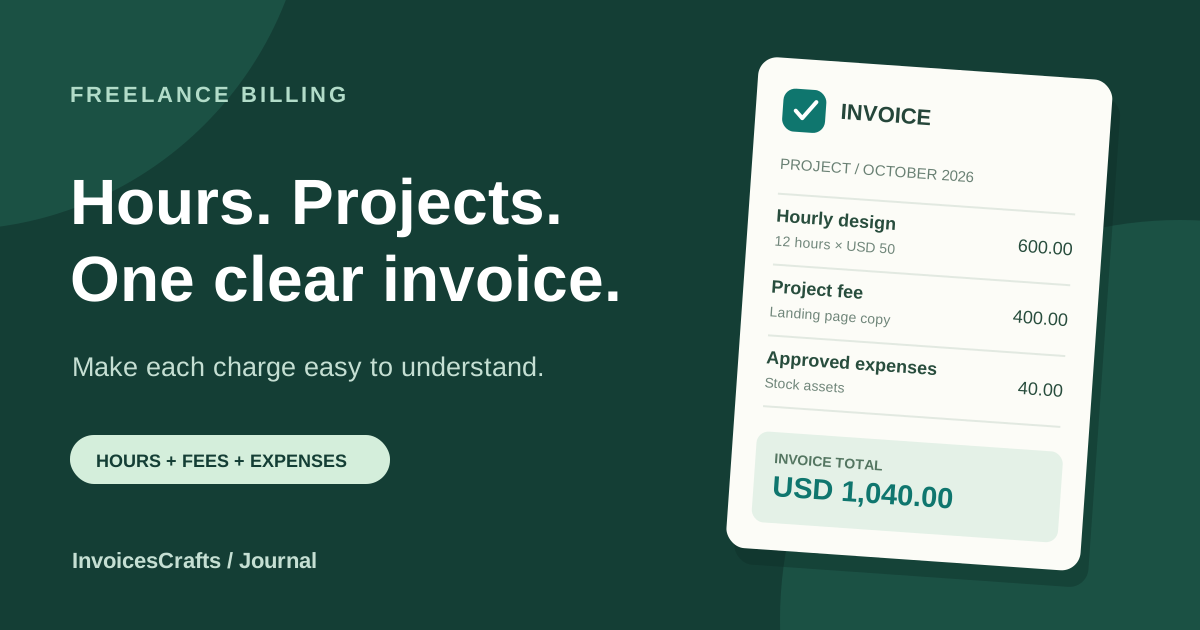
For example, 12 hours at USD 50 per hour produces a line total of USD 600. When tasks have different rates, put them on different lines. A timesheet invoice is useful when the client needs a visible work period and breakdown of hours alongside the charges.
Describe project fees and milestones separately
For an agreed project fee, use one line with a quantity of one and the agreed amount. Name the deliverable or milestone clearly, such as Landing page copy, approved final version. You do not need to invent an hourly breakdown for a project that was priced as a complete deliverable.
When a project includes a deposit or staged payments, make clear which stage this invoice covers. A deposit already received should reduce the outstanding balance, rather than appearing as a new charge. Check the preview carefully so the customer can distinguish the total billed from the amount still due.
Keep approved expenses visible
List reimbursable expenses separately from your professional fees. Describe what the expense covered and check that it was approved under the agreement. If the customer needs supporting receipts, provide them through your normal delivery method alongside the invoice.
Do not assume that every expense has the same tax treatment as your service fees. Review the rules relevant to your transaction before selecting a tax preset. InvoicesCrafts provides country-aware fields and presets to help you enter the document; they do not decide the legal treatment of the sale.
Give the client an exact amount and a clear next step
Show the currency code, due date and agreed payment method. A currency symbol alone can be ambiguous when you work internationally. If the agreement uses USD, enter the amounts in USD and check that the finished document says so.
Choose your billing country in the generator, confirm the currency, and review the total before exporting. Currency selection changes the denomination and formatting; it does not convert an agreed price using live exchange rates. If conversion is needed, agree it separately before entering the final amounts.
Run a final check before sending
Read the finished document from the client's point of view. The customer should be able to match the work with the agreement, check the charges and understand the payment instructions without reconstructing the project history.
- Confirm the seller and client names, billing details and project reference.
- Match the service period, hours, rates and deliverables to the agreement.
- Separate hourly work, project fees and approved expenses.
- Review the currency and applicable tax treatment.
- Check deposits, the total and the remaining balance.
- Open the exported PDF and confirm the due date and payment instructions.
Worked example: combining hours and a project fee
Illustrative USD invoice with no tax or discount applied. It demonstrates the arithmetic only; review tax treatment separately for your own transaction.
- UX design review
- 12 hours × USD 50.00 = USD 600.00
- Landing page copy
- 1 project × USD 400.00 = USD 400.00
- Approved stock assets
- USD 40.00
- Invoice total
- USD 1,040.00
- Deposit already received
- USD 300.00
- Remaining balance
- USD 740.00
Common questions
Can I put hourly work and project fees on one invoice?
Yes. Use separate line items with clear descriptions, quantities and rates so the client can see how each charge was calculated.
Which template should I use for freelance work?
Start with the freelance invoice template for projects and client work. Use the timesheet invoice template when the billing period and hours need a more explicit breakdown.
Does exporting a PDF save an editable copy?
The PDF is separate from the editable draft. Keep the draft in the builder if you need to make changes and export a revised copy later. Guest drafts remain in the browser where you created them.