InvoicesCrafts
Choose a format you can read at a glance
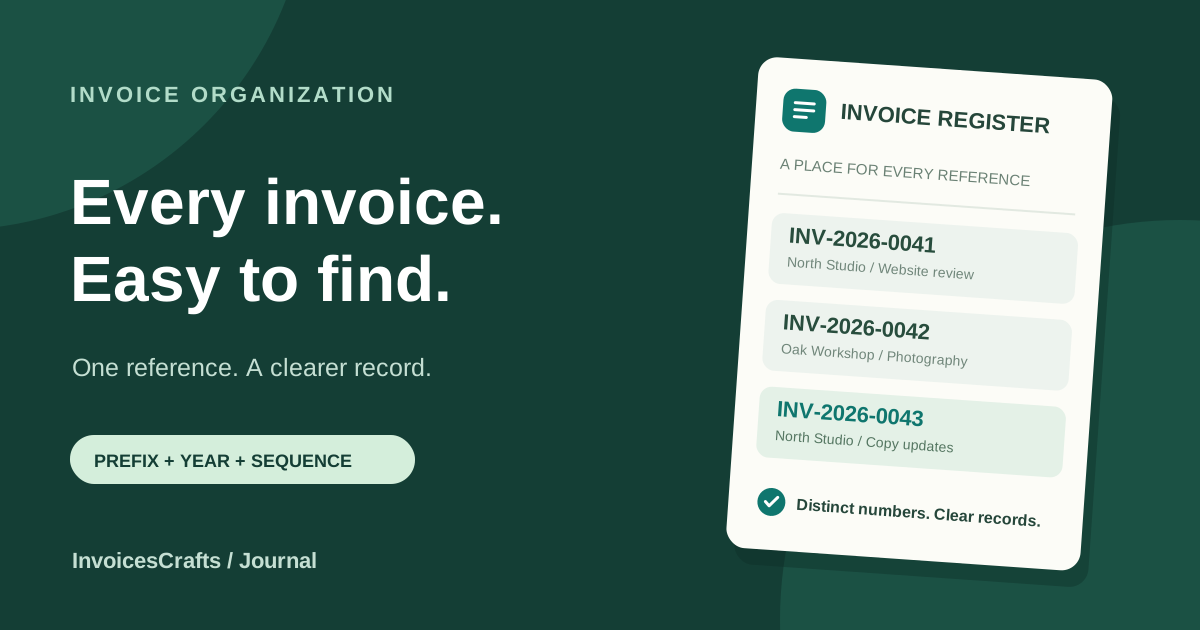
A useful starting format is INV-2026-0041: INV identifies the document, 2026 identifies the year and 0041 is its sequence number. The next invoice in that example would be INV-2026-0042. Keeping the sequence the same width makes references easier to scan and sort as text.
You can use another format if your existing records already have one. Write down what each part means and use the same convention consistently. Adding a customer name, project code and date to every number can make it harder to read; those details can usually live in their own invoice fields.
Keep one place to check the numbers you have used
Use a shared register or your invoice workspace to track the invoice number, customer, issue date, amount, due date and status. Before assigning a number manually, check that it does not already identify another invoice. Two different documents with the same reference can make a payment difficult to match.
If more than one person prepares invoices, agree who assigns numbers and where they record them. A browser draft or a PDF filename alone does not give everyone the same view of the next available reference. Keep the document's number and your register in step when moving between tools.
Check the saved number before exporting
In InvoicesCrafts, a new invoice saved to your signed-in workspace can receive an automatic number when you have left the number field unedited. The workspace assigns that number during the save and returns it to the builder. Check the saved document's reference before exporting the PDF or sending it to a customer.
If you type your own number, review it against your existing records. Guest drafts remain in the browser where they were created, so they do not coordinate a numbering sequence across devices or teammates. A sample number shown in a new builder is a starting value, not evidence that you have reserved it in a shared register.
Keep invoice and customer references separate
Your invoice number identifies your document. A customer's purchase-order number identifies their order or approval. Put the purchase-order reference in the relevant reference field rather than replacing your invoice number with it. That lets both sides search using the reference they recognize.
When you prepare quotations, receipts or credit notes as well as invoices, make the document type clear. Distinct prefixes can help you tell a quotation from an invoice at a glance. Keep a link between related documents in your records so a customer can trace the original work and any later adjustment.
Keep references stable after sending
Once a customer has received an invoice, use that same reference in your correspondence and payment records. Renaming a PDF does not change the number printed inside it. If you export the draft again, open the new PDF and check that the reference still matches the document you intend to send.
If a sent invoice needs a correction, preserve a record of the original and make the relationship to the correction clear. Avoid assigning its number to an unrelated bill just to fill a gap in a spreadsheet. Keep a note explaining unused or cancelled references so you can understand the history later.
Use a short numbering check for every invoice
A numbering routine works best when it is easy to repeat. Review the reference alongside the customer and amounts, then keep the final PDF with the saved document. If you include a year in your format, plan the next year's sequence before issuing its first invoice and check the complete reference for duplicates.
- Confirm the format and the sequence you are using.
- Check that the complete number does not identify another invoice.
- Keep the customer's order reference in its own field.
- Save the document and verify the assigned number.
- Match the number in the PDF, your register and your message to the customer.
- Keep the reference when recording payments or discussing a correction.
Worked example: three invoices, three clear references
An illustrative register using a prefix, year and four-digit sequence. The customer and order references are recorded separately from the invoice number.
- INV-2026-0041
- North Studio · Website review · Customer order PO-318
- INV-2026-0042
- Oak Workshop · Product photography · Customer order PO-204
- INV-2026-0043
- North Studio · Copy updates · Customer order PO-327
- Next reference to check
- INV-2026-0044, after confirming it is unused
- Payment reference for the first invoice
- INV-2026-0041, matching the number on its PDF
Common questions
Is an invoice number the same as a purchase-order number?
No. Your invoice number identifies the bill you issue. A purchase-order number is the customer's reference for an order or approval. Record both separately when the customer provides an order reference.
Does a guest draft reserve an invoice number across devices?
No. Guest drafts are stored in the browser where they were created. Check your own register before assigning a manual number, or review the number returned when saving a new invoice to your signed-in workspace.
Should a payment reminder use a new invoice number?
When the reminder concerns the same invoice, refer to its existing number so the customer can find the original document. Creating another reference for the same bill can make the conversation harder to follow.