InvoicesCrafts
Choose one invoice filename pattern
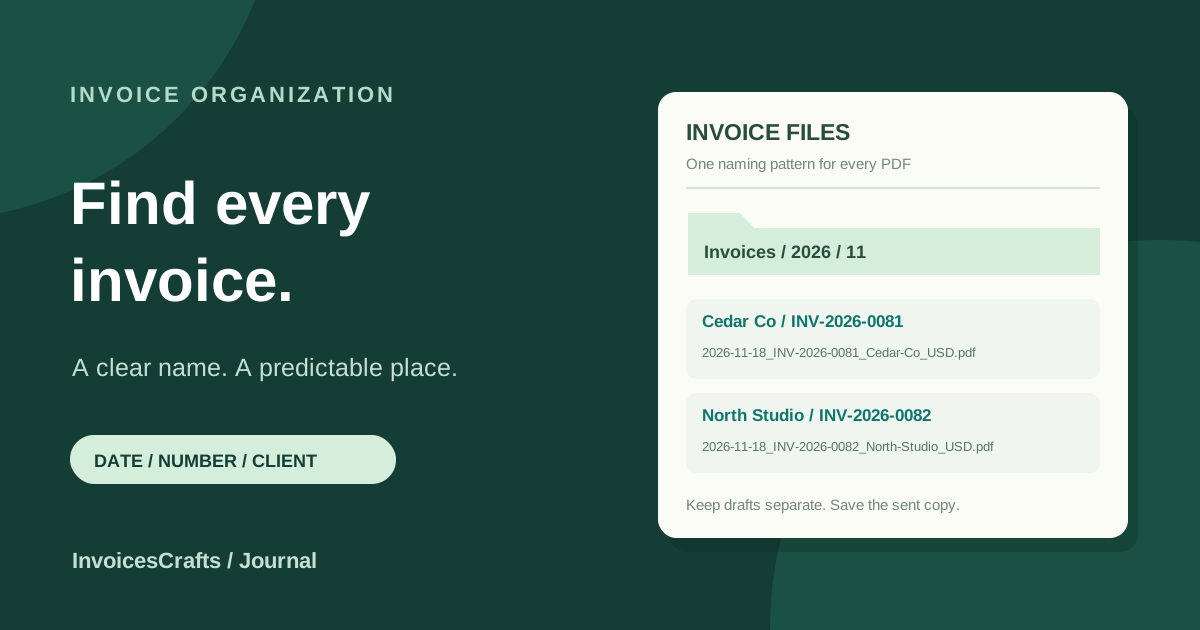
A practical pattern is issue-date_invoice-number_client_currency.pdf. For example, 2026-11-18_INV-2026-0081_Cedar-Co_USD.pdf tells you when the invoice was issued, which document it is, who it belongs to and the currency. You can omit the currency if it adds no useful distinction to your records.
Keep the client label short and recognizable. Use Cedar-Co rather than copying a full billing address into the filename. Choose consistent separators, such as underscores between fields and hyphens within a field, so you do not have to guess how a file was named when you search for it later.
Use letters, numbers, hyphens and underscores for the descriptive parts of the name. Avoid slashes or colons in those parts because common file systems reserve them for paths or other functions. A date such as 2026-11-18 is easier to use in a filename than 18/11/2026.
Keep the invoice number and filename connected
The invoice number inside the document identifies the bill. The filename helps you store and retrieve that document. Copy the invoice number accurately into the filename, including a meaningful prefix or year, so a search for the reference can find the matching PDF.
Renaming a downloaded file does not change the invoice number printed inside it. If the document says INV-2026-0081, naming the PDF INV-2026-0082.pdf creates a mismatch. Check the document itself before you use its filename to update your invoice register or reply to a customer.
Use the same reference in the invoice email and tracking record. A customer reply about INV-2026-0081 should lead you to the sent PDF and its related records without relying on the customer's name alone.
Organize folders by one consistent date
For a small collection, start with an Invoices folder, then a year and month, such as Invoices/2026/11. Use the invoice issue date to choose the month. An invoice issued in November and due in December stays in the November folder under this system.
If you prefer client folders, use a consistent structure such as Invoices/Cedar-Co/2026. Pick the arrangement you are most likely to use when looking up a document. You do not need to keep separate copies in both a monthly folder and a client folder just to support two ways of searching.
Keep payment status in your invoice register or workspace. Moving the only PDF between Unpaid, Overdue and Paid folders can break saved file references and leave you unsure where it went. A stable location makes the document easier to find while its payment status changes.
Separate editable drafts from the copies you sent
An editable draft and an exported PDF serve different purposes. The draft is where you prepare the document; the PDF is a snapshot that you can send and keep. Store work in progress in a clearly labeled Drafts location or in your invoice builder, and retain the exact PDF you submitted to the customer.
Avoid a sequence of ambiguous names such as invoice-final.pdf, invoice-final-new.pdf and invoice-final-final.pdf. If you need to retain several working exports, put them in a draft folder with a clear version label. Keep the sent copy identifiable in the main filing system.
If you later send another version, retain the earlier sent copy and record which document was sent on each date. File names can help distinguish copies, but they do not explain why the document changed. Keep the accompanying correspondence and a short note in your tracking record.
Check the attachment and connect supporting records
Open the PDF you intend to send and compare its invoice number, customer and issue date with the filename. Confirm that the pages are readable and that you have selected the intended copy. Changing a file extension to .pdf does not convert another file type into a PDF; use your builder's export or print function to create the document.
When a customer requests a timesheet, delivery record or other supporting file, use a recognizable reference to connect it to the invoice. For example, INV-2026-0081_timesheet.pdf can sit alongside the matching invoice without being mistaken for the invoice itself.
If the customer specifies an attachment name or supplier-portal convention, follow that submission requirement. Record the submitted filename and location in your register if they differ from your usual pattern. Keep a backup of your invoice files and the record that points to them.
A checklist for saving and sending invoice PDFs
Use the same short check whenever you export an invoice. A repeatable pattern is more useful than a detailed folder system that you have to reinvent for each customer.
- Include the invoice number and a short, recognizable client name.
- Use a consistent issue-date format if dates are part of your filenames.
- Match the filename to the invoice number and customer inside the PDF.
- Save the sent copy in a stable folder and keep working drafts separate.
- Connect supporting files and the invoice register with the same reference.
- Open the selected attachment, follow the customer's naming requirements and keep a backup.
Example: two invoices filed in the same month
These fictional files use the issue date, invoice number, short client name and currency. Both invoices were issued on 18 November 2026 and are stored by issue month.
- Folder for the sent PDFs
- Invoices/2026/11
- Cedar Co invoice
- 2026-11-18_INV-2026-0081_Cedar-Co_USD.pdf
- North Studio invoice
- 2026-11-18_INV-2026-0082_North-Studio_USD.pdf
- Supporting file for Cedar Co
- INV-2026-0081_timesheet.pdf
- Invoice register reference
- Record each invoice number with its saved file location, sent date and current payment status
Common questions
What should I name an invoice PDF?
Use the invoice number and a short client name. An optional issue date and currency can add context, for example 2026-11-18_INV-2026-0081_Cedar-Co_USD.pdf. Follow a customer's specific filename requirement when one is provided.
Should the filename use the issue date or the due date?
For the folder system in this article, use the issue date consistently. Keep the due date in the invoice and tracking record so the file does not need to move when payment becomes due.
Does renaming the PDF change the invoice number?
No. Renaming a file changes its storage name, not the invoice number inside the document. Check that the filename and the reference printed in the PDF match.
Should I keep the editable draft after exporting a PDF?
Keep the editable draft if you need to work with it again, and retain the exact PDF you sent as a separate record. Use clearly labeled locations so a working copy is easy to distinguish from a submitted invoice.