InvoicesCrafts
Start with one register for sent invoices
Choose one place to maintain the current record, such as your invoicing workspace or a spreadsheet. Give each issued invoice one entry, identified by its unique invoice number. Keep the final document and a reference to where you sent it so you can retrieve the same invoice when a customer asks a question.
Keep drafts separate from issued invoices. A draft that has not been sent should not appear as a customer balance awaiting payment. If you use more than one tool, decide which record you will update first and how you will keep the other copies consistent. Two competing lists make it harder to tell which information is current.
Record the details you need for the next action
Start with the invoice number, customer, issue date, due date, currency, invoice total, confirmed payments and balance remaining. Use an exact due date rather than leaving yourself to recalculate a term such as Net 30 each time you open the register.
Add the billing contact, submission reference and a link or file reference for the invoice. For follow-up, keep the last contact date, a short factual note and the next action date. For example, Accounts team confirmed receipt on 17 November; check payment update on 20 November, is more useful than a note that simply says Chased.
Use a consistent format for dates and always record the currency code. USD 600 and CAD 600 are different amounts. Review open totals separately by currency so the register does not present a mixed-currency sum as a single amount owed.
Update balances when you confirm payments
Match each received payment to the relevant invoice before updating its balance. Record the amount, date and payment reference, and retain the supporting payment record. If a customer says a transfer has been sent, note that message separately until you can confirm receipt.
For an invoice of USD 900 with a confirmed USD 300 payment and no other adjustments, the remaining balance is USD 600. Keep the original invoice total visible and record the payment separately rather than replacing the invoice total with the amount still due.
If one transfer covers several invoices, document the amount allocated to each and check that the allocations match the transfer. If the reference is unclear, ask the customer which invoices the payment covers before marking them as paid. Review any unexplained difference instead of silently changing the figures to make them match.
Distinguish outstanding balances from overdue balances
An outstanding balance is an amount that remains unpaid. It can belong to an invoice whose due date has not arrived yet. For a routine tracking review, treat a positive balance as overdue once its agreed due date has passed, after checking any documented change to the terms.
Payment progress and due-date status answer different questions. An invoice can be partially paid and also overdue. Record both the remaining balance and the due date so a Partially paid label does not hide the need for a follow-up.
Keep a question or dispute visible as a separate note or flag. Record what needs to be resolved, who is handling it and when to check again. A balance alone cannot tell you whether the next step is a reminder, a corrected reference or a conversation about the work.
Use a short weekly invoice review
Choose a regular review time and check new invoices, recent payments and all open balances. Start by updating the records from confirmed information. Then check invoices approaching their due dates and those already overdue, so your next action reflects the customer's current position.
Before sending a payment reminder, verify the remaining amount, due date, billing contact and any recent reply or payment. Include the invoice number and a copy of the relevant document when appropriate. Record the message and set the next action date so you can follow up without relying on memory.
A weekly review is a practical starting routine, not a reason to wait when new information arrives. Update the register as payments or customer replies are confirmed. Adjust the review frequency to the volume of invoices and the follow-up dates you have agreed.
Invoice tracking checklist
Use the same short checklist each time you review the register. The aim is a current record with a clear next step for every open item.
- Add each newly issued invoice once, with its own invoice number.
- Check the customer, due date, currency and reference to the sent document.
- Match confirmed payments to invoices and update the remaining balances.
- Review outstanding amounts separately by currency and identify overdue balances.
- Check customer replies, disputes and recent payments before sending reminders.
- Record the last contact and next action date, and keep the register backed up.
Worked example: a register reviewed on 18 November 2026
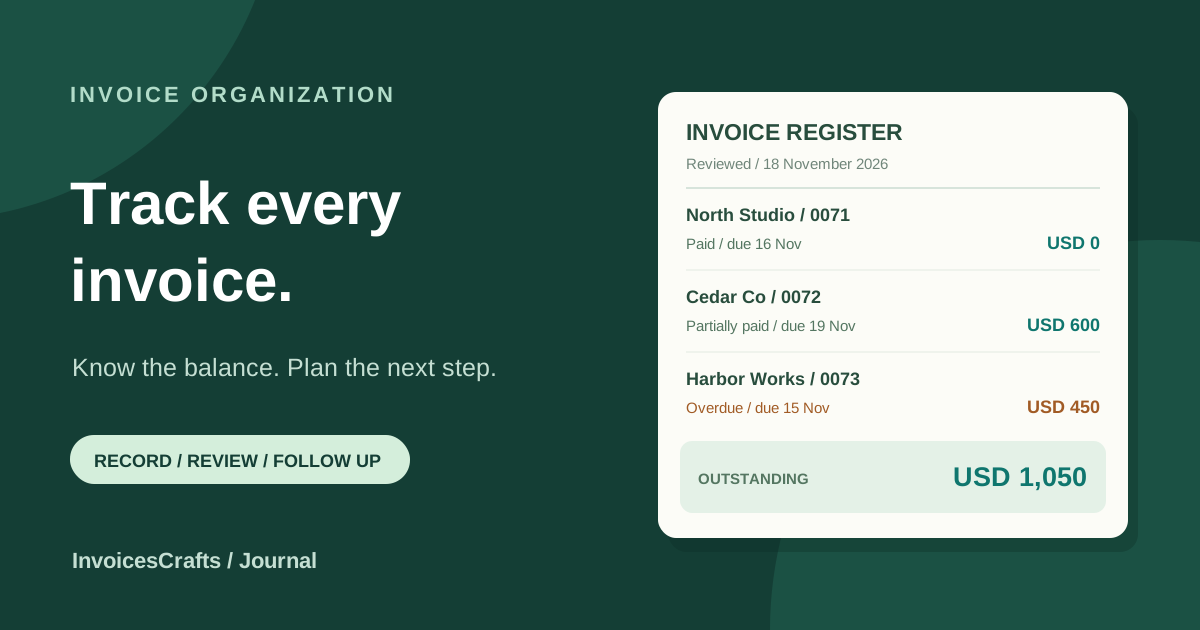
These fictional USD invoices have no adjustments other than the confirmed payments shown. Compare each due date with the review date before deciding which balance needs an overdue reminder.
- INV-2026-0071 / North Studio / due 16 November
- USD 600 invoiced − USD 600 received = USD 0 remaining; paid
- INV-2026-0072 / Cedar Co / due 19 November
- USD 900 invoiced − USD 300 received = USD 600 remaining; partially paid, not yet overdue
- INV-2026-0073 / Harbor Works / due 15 November
- USD 450 invoiced − USD 0 received = USD 450 remaining; overdue
- Total outstanding
- USD 600 + USD 450 = USD 1,050
- Overdue balance within that total
- USD 450; confirm the latest payment record and follow up with Harbor Works
Common questions
What is an invoice register?
An invoice register is a list of issued invoices and their key details, such as customer, invoice number, due date, currency, payments and remaining balance. It helps you find the current record and decide what needs attention.
Is an outstanding invoice always overdue?
No. An invoice can have an unpaid balance before its due date. Check the agreed due date and any documented change to the terms when deciding whether the remaining amount is overdue.
How should I track a partial payment?
Keep the invoice total, record the confirmed payment amount and reference separately, and show the remaining balance. Continue checking that balance against the due date until the invoice is fully settled or another documented adjustment applies.
How often should I update my invoice tracker?
Update it when an invoice is issued, a payment is confirmed or a customer reply changes the next action. A weekly review can help you catch missing updates and plan follow-ups; adjust the frequency to your workload.